Botanical Legacy for iPhone
Botanical Legacy runs natively on iPhone
Capture a specimen with the on-device detector, take care reminders as notifications, and keep the Sanctuary one tap from the home screen.
Botanical Legacy for Android
Botanical Legacy runs natively on Android
Capture a specimen with the on-device detector, take care reminders as notifications, and keep the Sanctuary one tap from the home screen.
Botanical Legacy for macOS
Botanical Legacy runs natively on macOS
Care alerts arrive as desktop banners, the tray carries a live count of what is due, and the Sanctuary opens without a browser.
Botanical Legacy for Windows
Botanical Legacy runs natively on Windows
Care alerts arrive as desktop banners, the tray carries a live count of what is due, and the Sanctuary opens without a browser.
Botanical Legacy for Linux
Botanical Legacy runs natively on Linux
Care alerts arrive as desktop banners, the tray carries a live count of what is due, and the Sanctuary opens without a browser.
The Doctor
Plant care for iPhone, Android and web
Photograph it. Know what's wrong.
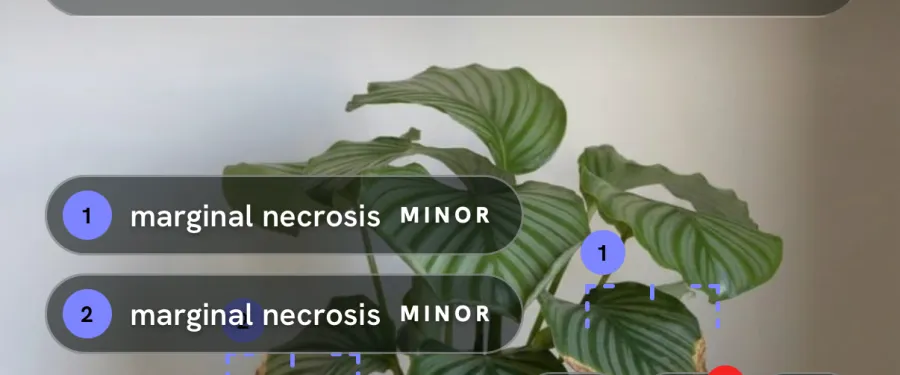
Photograph the whole plant, close enough to see the leaf that worries you. The Doctor reads the photo for pests, disease and stress, marks what it found on the picture, and lists what to do for that plant.
3
Photo reads a month on the free plan, for good
120
Photo reads a month on the trial · identify or diagnose
14 days
Cultivator trial · no card
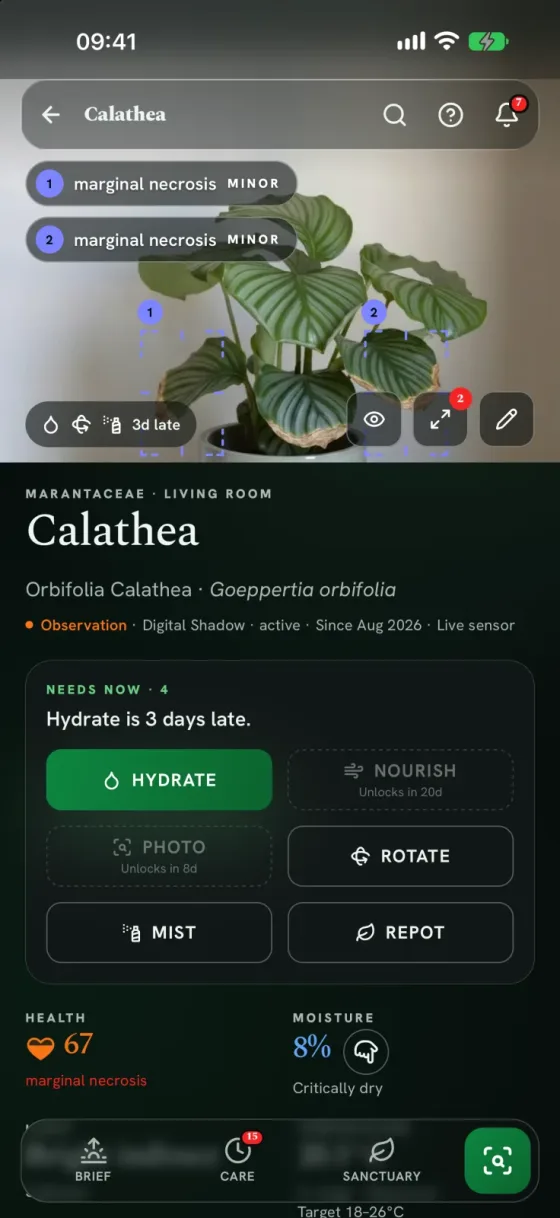
What it found, and what to do about it.
Marked on the photo
Where it can, the Doctor boxes each finding on the photo, so you can see which leaf it means.
How serious, and how sure
A severity for each finding and a confidence figure for the read.
What to do
Steps for this plant and how it is kept, not a generic care sheet.
Compared next time
Photograph it again later and the Doctor compares the new photo with the plant's last one.
Then it keeps an eye on it.
Every plant you photograph gets its own page, so the read is not the end of it.
When to water, for this pot
A date from its own pot, soil and light, re-forecast every night.
The next likely risk
What its last read says to watch for next, and the next good moment to act.
One short list each morning
Only what is due. A tap or two logs it.
Your first read, tonight.
Sign up free
Email, Google or Apple. No card, and the 14-day trial starts when your account is confirmed.
Photograph the plant
In good light, with the whole plant in the frame. It names the species and opens the plant's page.
Ask the Doctor
One tap on the plant page, then a photo of the whole plant. Follow the list, and photograph it again later to compare.
Calibrated to the size of your Sanctuary.
Cancel any month. Your Digital Shadow archive is always yours to export.
Observer: Free/ mo
Sanctuary basics for your first 5 specimens
- 5 specimens
- Digital Shadow · nightly recalibration
- Daily Sanctuary Brief
- Care reminders & protocols
- 12 progress photos / specimen / year
- 3 photo reads / month · identify or diagnose
Cultivator: €6.99/ mo
The full observatory
- 50 specimens
- 120 photo reads / month · identify or diagnose
- Live what-if simulator
- Sensor telemetry (up to 50 connected)
- Weather Intelligence: frost & heatwave alerts for outdoor plants
- Away mode + printable sitter sheet
- Visual Progression: 24 progress photos / specimen / year
Conservancy: €14.99/ mo
For collections & private gardens
- Everything in Cultivator
- 150 specimens · 360 photo reads / month
- Up to 150 sensor connections
- 52 progress photos / specimen / year
Everything, calmly answered.
What is a photo read?
One plant identified, or one Doctor diagnosis of a plant you have. Both draw on the same monthly allowance: 3 on the free plan, 120 on Cultivator and its trial, 360 on Conservancy. It resets on the 1st of each month.
Is the Doctor always right?
No, and it says how sure it is. Every read shows a confidence figure, the severity, and where on the photo it looked. Treat it as a careful second opinion: follow the list, take another photo of the plant later, and it compares the two.
Why not ask a chatbot to diagnose my plant?
A chatbot forgets your plant when the chat ends. Here every plant keeps its own history: photos and care log, plus recent weather and sensor readings. The Doctor compares a new photo with the last one, and the watering date is re-forecast every night from that plant's own record.
What is free on the Observer plan?
Five specimens, their Digital Shadow and nightly recalibration, the daily Sanctuary Brief, care reminders and protocols, 12 progress photographs per specimen per year, and 3 photo reads a month. Each read either identifies a new plant or runs the Doctor's diagnosis on a specimen, and both draw on that one allowance. The 14-day trial raises it to 120 a month.
How do I start the 14-day trial?
You do not have to do anything. Once your account is confirmed, the 14-day Cultivator trial starts by itself, even if you switch the signup form to Observer, and whether you signed up with a passphrase or with Google or Apple. No card is asked for at any point, and nothing charges when the 14 days end: the account reverts to Observer with every specimen kept. Pick Conservancy at signup instead and you get that tier's 7-day trial.
What happens after my 14-day trial?
Every specimen and its Digital Shadow history stays in your Sanctuary. The plan reverts to Observer, and while you have more than 5 specimens you cannot add another. Subscribe whenever you want to add more.
Will I get surprise charges or a cancellation maze?
No. Prices are shown in full before you subscribe, the trial needs no card, and you cancel from the Guardian page in two clicks. Cancelling stops the renewal and access runs to the end of the period already paid for.
Do I need to install an app?
No. The Sanctuary runs in any modern browser, on a phone as well as a desktop, and can be added to the home screen. If you would rather install it, the iPhone app is on the App Store, Android is on Google Play, Amazon Appstore (Fire tablets), Xiaomi GetApps and Huawei AppGallery, and the macOS, Windows and Linux desktop builds are on the download page.
Which plants are supported?
Botanical Vision v5 recognises thousands of species and fills in the profile from botanical databases. If it cannot place the photo, no specimen is added, so try a clearer one. The identification can be corrected by hand at any time.
Can I get my data out?
Any time. One button in Guardian → Privacy downloads a dated archive holding every specimen, care log, photograph, location and setting on the account.
Photograph the plant that worries you.
Free to start, no card. 120 photo reads a month for the first 14 days, and nothing charges when they end.